WordPress install
The easiest way: install the official Snorklee Analytics plugin 3.0+. It adds the Snorklee code to all your pages, sees the AI crawlers that JavaScript cannot, offers three modes against script blockers, and checks that everything works — all without touching your theme.
Recommended — Official plugin
- Download the plugin from Settings › Installation in the dashboard, WordPress plugin part, or open the Snorklee WordPress plugin page.
- In WordPress: Plugins → Add New → Upload Plugin. Select the
.zip. - Activate the plugin.
- Open Snorklee in wp-admin, verify the site domain and keep the dashboard URL set to
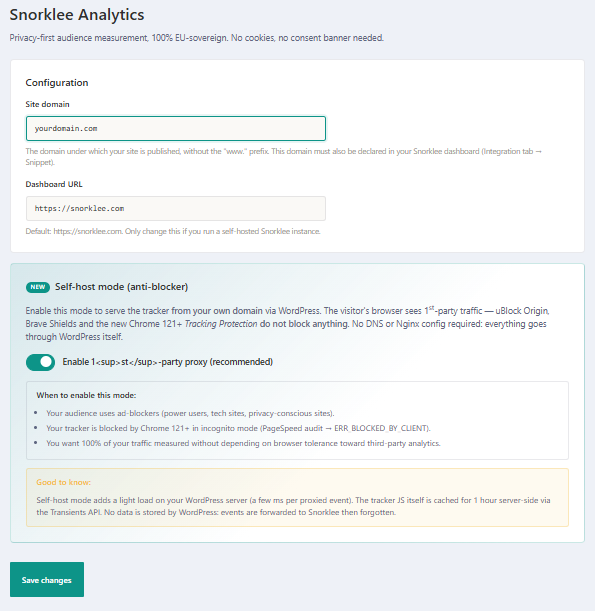
https://snorklee.comunless you run a self-hosted instance. - Then choose how the tracker is installed. Three modes, each stating its cost: standard (everything comes from Snorklee), script served by WordPress — recommended: your domain serves
/js/flow.jswhile the measurements go straight from the browser, so nothing is lost — and full relay, where WordPress also passes/api/eventand/api/pingthrough. The relay escapes every blocker, but Snorklee then only sees your server: no country, no region, and unique visitors and traffic sources stop being reliable. - Save, then click Test installation.
Done. The Snorklee code adds itself to the <head> of every public page. In “script served by WordPress” mode it looks like:
<script defer src="/js/flow.js" data-site="yoursite.com" data-api="https://snorklee.com"></script>What the plugin looks like
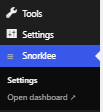
After activation, a Snorklee menu appears in the wp-admin sidebar (“Settings” and “Open dashboard”):
The settings page groups the site domain, the dashboard URL and the three install modes, each with its cost:
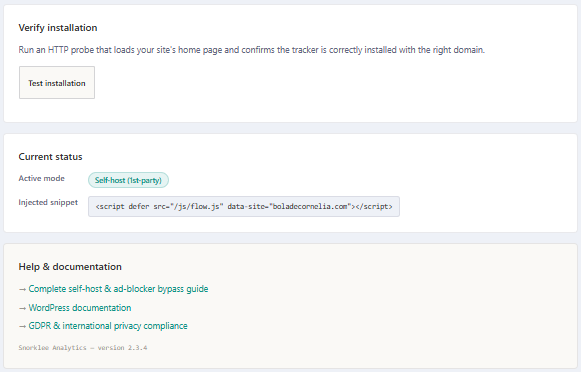
Lower down, Test installation checks your live page, and current status shows the active mode and the code actually in place:
Manual — header.php
If you'd rather not install a plugin (for example because you keep your theme in Git), paste the Snorklee code directly into your theme's <head>.
- In WordPress: Appearance → Theme File Editor.
- Pick
header.phpin the right column. - Paste the code right before
</head>:
<script defer src="https://snorklee.com/w.js" data-site="yoursite.com"></script>- Click Update File.
Heads up: if you update your theme, your edit will be overwritten. Prefer a child theme or a plugin (e.g. Insert Headers and Footers).
Verify
Follow the Verify the install guide. For WordPress, also check that:
- You're not running an aggressive cache plugin that strips dynamic
<head>content or the/js/flow.jsand/api/*routes. - You don't have a consent plugin blocking scripts it doesn't know about. Snorklee's default mode is built to measure your audience without a dedicated banner, see Compliance.